Flag Assignment
Flags are a feature of Family Historian that allow individuals to be 'tagged'. For example an individual who has a census fact for a Welsh census in 1851 could be allocated an '1851 Wales Census' flag, if you have a marriage record for an individual you can allocate a Marriage Certificate flag, etc.
Ancestral Sources can automatically add flags of your choice to individuals that have entries added. The Flag Assignment screen works in two different modes, depending on whether in census source mode or dealing with another source type. If you select the Flag Assignment option from the Tools menu on the main screen then this screen will appear.
Census Flag Assignment
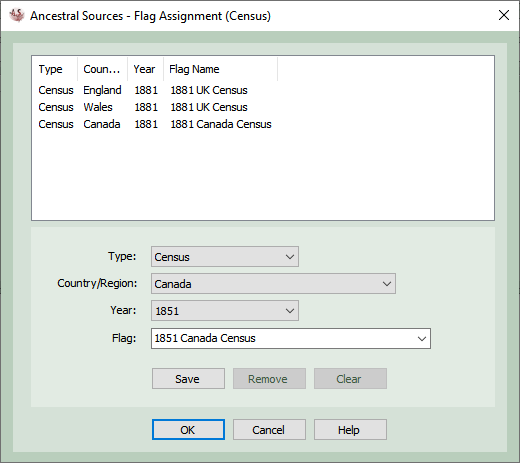
When dealing with census entries the Flag Assignment allows you to associate each census type, region and year with an appropriate flag.
Select a census type, region and year from the lists. A flag name to use will be suggested in the Flag list.. You can choose to use this suggestion, type in your own, or if you already have suitable flags already in your GEDCOM file these can be selected from the flag list.
Click Save to associate the selected census with the flag.
Select a flag association from the list at the top and click Remove to delete the flag association.
Click on Clear if you want to clear the boxes so that you can begin to create another flag association.
Finally click OK to save the changes.
Flag Assignment: BMD Records
This screen can be used to associate flags with non-census records.
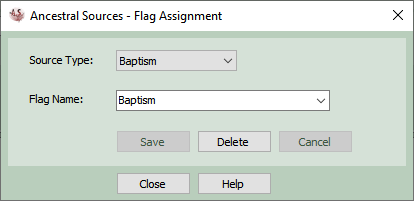
For all non-census sources you can either type in a name for your flag or select an existing flag from the flag list. Once this flag is associated to the source type, then when the record is saved the key person or people (e.g. the individual being baptised, the people who were married) will have this flag added to them.
You may decide to the use Flag Batch Add screen to add (or remove) flags to individuals in your file based on existing facts.