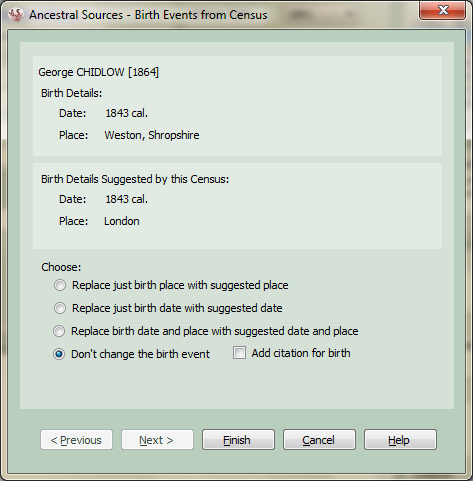
Birth Events from Census
This screen will only ever appear if offer to create birth facts is set in the Census Settings the Options screen. When the census entry is being saved this screen will appear if the age, date of birth or place of birth entered for any individual could lead to the addition of a new birth fact or amendment of an existing birth fact for them. Each applicable individual (or all individual if the option offer to create birth facts even if existing birth includes place and date is set) can have birth fact information set for them by clicking on the appropriate option and scrolling through the entries with the Previous and Next buttons. Once all the options are set to your satisfaction click on the Finish button to complete saving the entry or Cancel to cancel saving and go back to the main form.
For each individual the top panel on the screen shows the name of the individual and the date and/or place of birth if known. In the second panel will be the date of birth and place of birth suggested by the census entry. The bottom panel will give options to create a new birth fact, amend date of birth, place of birth or not make any changes.
Depending on the choices made on this screen, birth facts will be created or amended for each individual and linked to the census source via a citation.
Although not used by the majority of genealogists, it is possible to record multiple birth facts for individuals. If the multiple births option is selected then a further choice will be presented to allow for an additional birth entry to be created for each individual who already has an existing birth entry. This option probably works best in conjunction with the offer to create birth facts even if existing birth includes place and date option.
You may choose not to change the existing birth event. However, there is a checkbox you can tick to link a citation to the source if you feel that the census source provides additional evidence for the birth entry being correct. There is an option to have this always ticked by default on the Options screen.