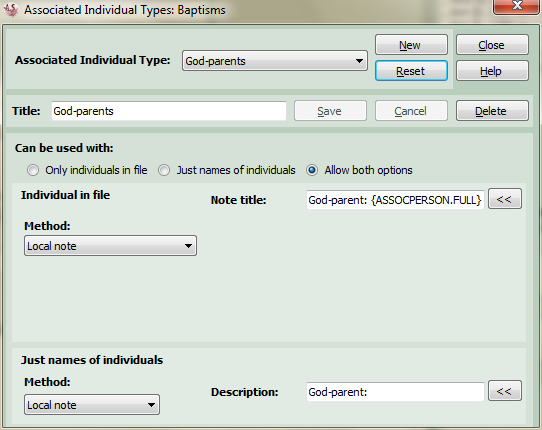
Associated Individual Types
Associated individuals can be used with all source types except census and refer to the recording of people who are linked in some way to the event being recorded. Some obvious examples being godparents or witnesses at baptisms and weddings. This screen can be used to create different types of associated individual or adjust the way that the data is recorded in your file. In addition you may decide to use associated individuals to record the minister or priest at a baptism, marriage, burial, etc. rather than the Minister text box.
The Associated Individual Types screen is accessed either from the Options screen for the relevant source document type or by clicking Edit... in the associated individuals panel on the Further Info tab on the Main Screen.
You may decide to edit an existing associated individual type (e.g. godparents or witnesses for baptisms) by selecting from the drop-down list or you can click the New button to create an entirely new association type (the screen is ready to accept a new association type when it first loads up).
Press the Reset button if you ever want to reload the original association types supplied with Ancestral Sources.
If you select an existing association type you can select Delete to remove it. Changes made to a new or existing association type can be made by clicking Save or if you change your mind click Cancel.
Creating or Editing Associated Individual Types
Title: Every association type requires a title (e.g. Godparents or Witnesses).
Individual Type: Some users choose to add godparents and other associated individuals to their file as individuals and record details of the association as events or notes linked to them. Others prefer just to record the name of the individual in source text or a local note attached to the main fact being created. Choose the Only Individuals in File option if you will always have the data recorded against individuals in the file. Choose Just names of individuals if you will never link the data to individuals in the file. Choose Allow both options if you always want to have the choice to sometimes record the details against an individual in the file and other times to just record the name.
You can decide on the method used to record the data depending on whether the associated individual is in the file or if just the name is being recorded. For whichever method you choose you can specify a template made up of text and (optionally) template keywords.
Individuals in the file
If the associated individual is in the file there are several methods that you can choose from. You may wish to experiment with these types using a test file before using with your usual family history file:
Witness Role: The witness role was first introduced in version 6 of Family Historian specifically as a method to associate individuals with a fact. Therefore this is almost certainly the best method to use if you have Family Historian 6 and is the default scheme used in Ancestral Sources. The description will be the name of the witness role in Family Historian and care should be taken that they match, e.g. Witness, Godparent, Minister, Priest, Rabbi, Mourner, Bridesmaid, Best Man. The note is probably best left blank for the template.
Association Structure: The association structure is a GEDCOM feature which creates a link from one individual to another. It is rather limited in its use and not particularly well supported by Family Historian up to version 6 (this may change in future versions), e.g. it can not be shown in reports. You can specify the relationship of the key individual (e.g. the child being baptised) to the associated individual (e.g the god-parent) and so the relationship might be god-child. You can also specify a note to explain the relationship being recorded, e.g. {ASSOCPERSON.FULL} was god-parent at baptism of {KEYPERSON.FULL} which uses template keywords to display the full names of the associated person and the key person. This association structure would be linked to the associated individual and also the source for the record being created.
Association Structure - both ways: See the previous paragraph on Association Structure for details of the GEDCOM association structure. This method works in the same way but creates 2 association structures. The first association structure would be linked to the key person (e.g. the individual being baptised). The relationship description for this association structure needs to be specified to explain the relationship of the associated individual to the key person e.g. god-parent. The second association structure is linked to the associated individual in exactly the same way described in the Association Structure method. The text of the note is copied into both association structures.
Linked Notes: This method will create a note record with linked to the event (e.g baptism) for the key individual and directly to the associated individual.
Custom Event: This will create an event fact for the associated individual with the specified event name and local note. Although the created event is accepted by Family Historian, the fact sentence is usually non-sensible. To correct this, a new matching fact should be created in Family Historian using Tools > Work with Fact Sets to define the sentence template, etc.
Custom Attribute: This will create an attribute fact for the associated individual with the specified attribute name, value and local note. Although the created attribute is accepted by Family Historian, the fact sentence is usually non-sensible. To correct this, a new matching fact should be created in Family Historian using Tools > Work with Fact Sets to define the sentence template, etc.
Local Note: This adds a new line to the local note for the main fact (e,g. baptism) with the contents of the note title. An example of the note title might be: God-parent: {ASSOCPERSON.FULL}. You must ensure you include the associated individual's name in the field, otherwise the note won't be very helpful!
Not Recorded: The associated individual will only be recorded in the source text and not in any other places in the file. N.b. if the source text doesn't include one of the ASSOCLIST keywords then the name of the associated individual will not be recorded anywhere!
Just names of individuals
Witness Role: The witness role was first introduced in version 6 of Family Historian specifically as a method to associate individuals with a fact. Therefore this is almost certainly the best method to use if you have Family Historian 6 and is the default scheme used in Ancestral Sources. The description will be the name of the witness role in Family Historian and care should be taken that they match, e.g. Witness, Godparent, Minister, Priest, Rabbi, Mourner, Bridesmaid, Best Man. The note is probably best left blank for the template.
Local Note: This adds a new line to the local note for the main fact (e,g. baptism) with the contents of the note title followed by a space and then the name of the individual entered by the user. e.g. the text could simply be God-parent:
Not Recorded: The associated individual will only be recorded in the source text and not in any other places in the file. N.b. if the source text doesn't include one of the ASSOCLIST keywords then the name of the associated individual will not be recorded anywhere!