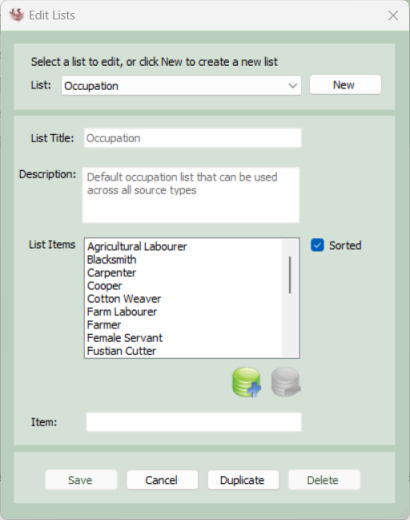
Edit Lists
This screen is accessed via the Tools menu on the main screen. Ancestral Sources has a number of different drop-down lists of items that are shown for various source types. This screen allows you to modify the contents of some of these lists.
Select the name of a list from the drop-down at the top. If this is a list that is built into Ancestral Sources then the name and description of the list will not be editable. You can edit an entry in the list by selecting it first and making the change in the text box at the bottom of the screen. List items can be added and removed using the +/- buttons. You can specify if a list is automatically kept in alphabetical order using the sorted check box. If the list is not sorted, then the order of the items in the list can be changed manually using the up/down buttons.
It is also possible to create your own list using the New button or the Duplicate button if you wish to base your new list on an existing list. However, in the current version of Ancestral Sources the only reason to create a new list would be if you wish to specify a different list of occupations for a particular source (or sources)
Standard Lists
The following standard lists appear on this screen and can be edited if necessary
Birth Subtype: This list will be shown on the main birth source screen if the option to display the subtype list is ticked.
Baptism Subtype: This list will be shown on the main baptism source screen if the option to display the subtype list is ticked.
Marriage Subtype: This list will be shown on the main marriage source screen if the option to display the subtype list is ticked.
Death Subtype: This list will be shown on the main death source screen if the option to display the subtype list is ticked.
Burial Subtype: This list will be shown on the main burial source screen if the option to display the subtype list is ticked.
Monumental Inscription Subtype: This list will be shown on the main monumental inscription source screen if the option to display the subtype list is ticked.
Marriage Type, Marriage Status Male and Marriage Status Female: These populate the lists on the main marriage source screen.
Other Marriage Status Male and Other Marriage Status Female: These populate the mariage status lists on the burial and death source screens.
Occupation:By default this list of occupations will be displayed in any occupation lists for all source types. On the options screen for each source type you can opt to use a different occupation list that you can create yourself on this screen if you wish.
Census Not Occupation: If Don't record if in 'Census Not Occupation' List is selected on the Census Options screen, then any census individuals with occupations that match the items in the list will not have occupation facts generated.
Death Informant Information: Death certificates often use a phrase such as 'Present at Death' or 'In Attendance' following the name of the informant. This list is displayed on the informant section on main marriage source screen.